
How a hard drive works comes down to magnetism in motion: a stack of rigid platters spins at a fixed speed while a read/write head floats nanometers above each surface and flips the polarity of microscopic grains to record bits. A hard disk drive (HDD) writes data by aligning magnetic regions on a rotating platter and reads data by sensing those magnetic transitions with a moving head. The mechanical design – platters, heads, actuator arm, spindle motor, cache, and recording method – sets the speed, capacity, and shock sensitivity that separate a hard drive from a solid-state drive.
What Is a Hard Disk Drive?
A hard disk drive is a non-volatile storage device that records data magnetically on one or more rigid spinning platters read by a head suspended above the surface:
- Magnetic recording: the drive magnetizes microscopic regions on a coated platter, and the alignment persists without power – so an HDD is non-volatile secondary storage.
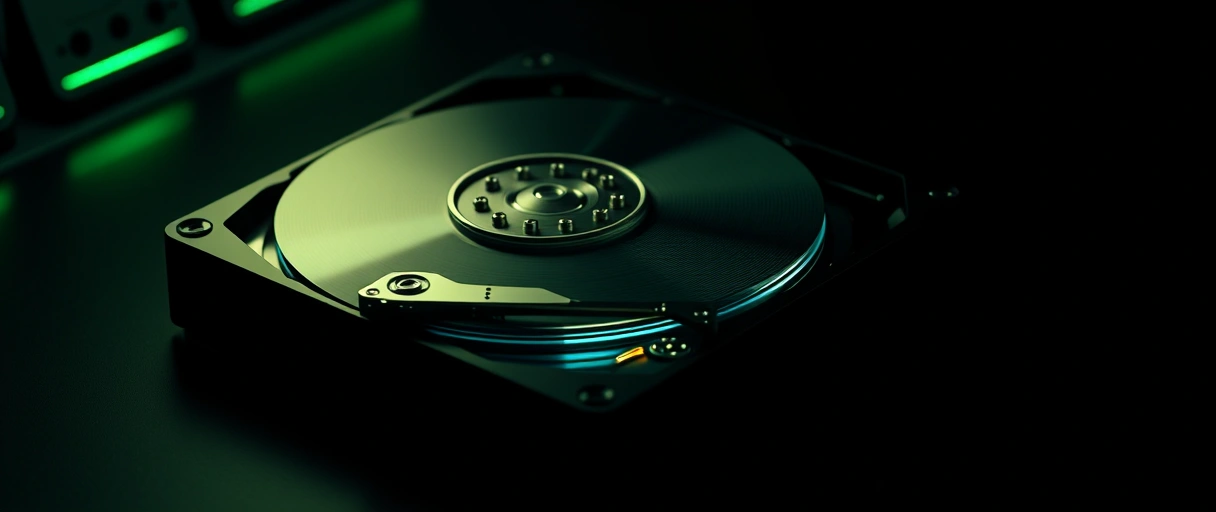
- Mechanical core: platters, a spindle motor, read/write heads, and an actuator arm work together inside a sealed enclosure.
- Who makes them: Seagate, Western Digital, and Toshiba build the platter-based drives used in desktops, servers, and external enclosures – their place in the primary versus secondary storage hierarchy explains the capacity-and-cost advantage over volatile memory.
What Are Platters, Tracks, Sectors, and Cylinders?
These are the geometric structures that organize data on a hard disk drive: a platter is a rigid magnetic disk, a track is a concentric ring on it, a sector is a fixed block within a track, and a cylinder is the set of identical tracks stacked across all platters:
- Platters store the data as aluminum or glass disks with a thin magnetic coating, spinning together on one spindle – one platter on small drives, up to 10-11 on high-capacity helium-filled models.
- Tracks divide each surface into hundreds of thousands of concentric rings, numbered from the outer edge inward.
- Sectors split each track into addressable blocks of 512 bytes or 4,096 bytes (Advanced Format) – the smallest unit a drive reads or writes.
- Cylinders group aligned tracks across every platter surface, letting the heads access the same radius without moving.
How Do Read/Write Heads and the Actuator Arm Work?
Read/write heads and the actuator arm position the sensing element over the correct track: each platter surface has one head mounted on an actuator arm, and a voice-coil motor swings the arm across the tracks in microseconds:

- Floating maintains the gap: the head rides an air bearing created by the spinning disk, about 3-5 nm above the surface, and never touches the platter in normal use.
- Writing sets polarity: a write head generates a magnetic field that aligns the grains; a giant magnetoresistive (GMR) read element senses the field changes as the platter passes beneath.
- Seeking moves the arm: the voice-coil motor swings all heads in unison to the target cylinder – it replaced older stepper motors because it positions faster and more precisely.
How Does a Read Actually Happen?
A read is a fixed five-step sequence the moment software asks for a block of data – the steps run in order every time:
- Spin. The spindle motor keeps the platters turning at a constant RPM so any sector eventually rotates under a head.
- Seek. The voice-coil actuator swings the head stack to the track that holds the data (seek time, ~8-12 ms).
- Settle & wait. The head settles on the track, then waits for the platter to bring the target sector around (rotational latency, ~4.2 ms at 7,200 RPM).
- Read the field. The magnetoresistive read head senses the magnetic transitions and converts them into the bit stream the controller decodes.
- Transfer. Data passes through the DRAM cache and out over the SATA interface to the rest of the system.
How Does a Hard Drive Store Data Magnetically?
A hard drive stores data magnetically by setting the polarity of microscopic grains on the platter coating, where each transition between orientations encodes a bit:
- The write head reverses orientation of small grain regions; the boundaries between opposite-polarity regions are what carry the binary data.
- Perpendicular recording (PMR) stands the grains vertically to the surface for far higher density than the older longitudinal method.
- The read head senses boundaries, not the regions themselves – a magnetic encoding that contrasts with the charge-trapping flash cells in how SSDs work, the core reason the two storage types differ in speed and durability.
What Is the Difference Between PMR, SMR, and HAMR?
PMR, SMR, and HAMR are magnetic recording technologies that trade areal density against write performance. Each writes the tracks differently:
PMR (CMR)
SMR
HAMR
The table summarizes the three recording technologies:
| Recording Type | Track Layout | Density Effect | Best Workload |
|---|---|---|---|
| PMR | Non-overlapping vertical tracks | Baseline density | General desktop and server use |
| SMR | Overlapping shingled tracks | 10% to 25% higher capacity | Archival and sequential writes |
| HAMR | Laser-heated narrow tracks | Highest density, 30 TB+ | High-capacity data center storage |
How Does Spindle Speed Affect Hard Drive Performance?
Spindle speed sets how fast the platters rotate, which directly lowers rotational latency and raises sustained transfer rate: common speeds are 5,400, 7,200, and 10,000-15,000 RPM:



- 7,200 RPM completes one rotation in about 8.3 ms (4.2 ms average latency); 5,400 RPM takes 11.1 ms (5.6 ms) – the mainstream desktop-versus-laptop split.
- 10,000 and 15,000 RPM enterprise drives cut latency to 3.0 and 2.0 ms for transactional workloads, but draw more power and run louder and hotter.
- Throughput too: faster rotation moves more bits per second past the head, so a 7,200 RPM drive sustains roughly 120-160 MB/s against 80-120 MB/s for 5,400 RPM.
The table maps each spindle-speed class to its rotation time and typical use:
| Recording Type | Track Layout | Density Effect | Best Workload |
|---|---|---|---|
| PMR | Non-overlapping vertical tracks | Baseline density | General desktop and server use |
| SMR | Overlapping shingled tracks | 10% to 25% higher capacity | Archival and sequential writes |
| HAMR | Laser-heated narrow tracks | Highest density, 30 TB+ | High-capacity data center storage |
How Does Spindle Speed Affect Hard Drive Performance?
Spindle speed sets how fast the platters rotate and directly affects data throughput and latency. Common spindle speeds are 5,400 RPM, 7,200 RPM, and 10,000 to 15,000 RPM, and a higher rotation rate lowers rotational latency and raises sustained transfer rate. A 7,200 RPM drive completes one rotation in about 8.3 milliseconds, while a 5,400 RPM drive takes about 11.1 milliseconds, which shortens the average wait for a sector to reach the head.
Enterprise 10,000 and 15,000 RPM drives from Seagate and Western Digital cut latency further for transactional workloads. Higher spindle speed also raises power draw, heat, and acoustic output.
The table maps each spindle-speed class to its rotation time and typical use:
| Spindle Speed | Rotation Time | Rotational Latency (avg) | Typical Use |
|---|---|---|---|
| 5,400 RPM | 11.1 ms | ~5.6 ms | Laptops, external and archival drives |
| 7,200 RPM | 8.3 ms | ~4.2 ms | Desktops, NAS, mainstream storage |
| 10,000 RPM | 6.0 ms | ~3.0 ms | Performance desktops and workstations |
| 15,000 RPM | 4.0 ms | ~2.0 ms | Enterprise and transactional servers |
What Is the Cache Buffer on a Hard Drive?
The cache buffer is a small block of volatile DRAM that holds data in transit between the platters and the host interface, typically 64 MB to 256 MB:
- What it does: stores recently accessed and prefetched data and buffers writes, so the controller can reorder requests and let the heads travel the shortest path.
- What it does not do: a larger cache improves burst transfer but never changes the underlying mechanical seek and rotation times.
- Volatile by design: the cache loses its contents on power loss, which is why the magnetic platters remain the persistent storage layer.
What Are Seek Time and Latency?
Seek time and latency are the two mechanical delays that determine how fast a hard drive reaches a requested sector:
- Seek time is the time the actuator needs to move the heads to the target track – 8 to 12 ms average on a desktop drive (track-to-track is under 1 ms).
- Rotational latency is the time the platter takes to spin the target sector under the head – about 4.2 ms on average at 7,200 RPM.
- Access time (seek + latency) lands around 5-10 ms total and dominates random reads, which is why hard drives lag flash on small scattered files.
Why Are Hard Drives Sensitive to Shock?
Hard drives are shock-sensitive because the read/write heads fly only nanometers above spinning platters, leaving no margin for contact:
- Head crash: a physical impact can drive the head into the platter, scratching the magnetic coating and destroying the data on the affected tracks.
- No clearance: the 3-5 nm flying height means the head cannot touch the disk without damage – and a powered drive is far more vulnerable than a parked one, because the heads are actively flying.
- Built-in protection: a ramp or landing zone parks the heads off the platter when idle, and accelerometer free-fall sensors retract the heads before impact in many laptop drives – mechanical fragility that solid-state drives avoid, as covered in the HDD and SSD comparison.
Last Thoughts on How Hard Drives Work
How a hard drive works centers on a precise mechanical system: platters spin at a fixed RPM, a voice-coil actuator swings flying heads across the tracks, and the write head sets magnetic polarity to record each bit. Spindle speed, cache size, seek time, and rotational latency together define performance, while PMR, SMR, and HAMR set the capacity ceiling – HAMR now pushing single drives to 36 TB and beyond.
The same flying-head design that enables high density also makes a hard drive shock-sensitive, since the heads ride 3-5 nm above the surface. That mechanical nature is the root of every trade-off against flash storage.
Key Takeaways:
- Hard drives store data magnetically on rigid spinning platters organized into tracks, sectors, and cylinders.
- Read/write heads ride an actuator arm that a voice-coil motor swings across the platters in microseconds.
- PMR, SMR, and HAMR trade density for write speed, with HAMR enabling capacities of 30 TB and beyond.
- Spindle speed sets latency, as 7,200 RPM halves the rotation time penalty of slower 5,400 RPM drives.
- Seek time and rotational latency dominate random access, which is why hard drives lag flash on scattered files.
- Flying heads make drives shock-sensitive, so an impact during operation can cause a destructive head crash.
Frequently Asked Questions (FAQs)
How does a hard drive store data?
A hard drive stores data by magnetizing tiny grain regions on a spinning platter. The write head reverses grain polarity, and each transition between orientations encodes binary data the read head later senses.
What is a good RPM for a hard drive?
7,200 RPM suits desktops and NAS for a balance of speed and noise. 5,400 RPM fits laptops and archival drives, while 10,000 to 15,000 RPM serves enterprise transactional workloads.
What is the difference between PMR and SMR drives?
PMR writes separate tracks for consistent random-write speed. SMR overlaps tracks to add 10% to 25% capacity but slows random rewrites, making SMR better for archival and sequential workloads.
What is seek time on a hard drive?
Seek time is the milliseconds the actuator needs to move the heads to the target track, typically 8 to 12 milliseconds on desktop drives. It is a main factor in random-access speed.
Why are hard drives sensitive to shock?
Hard drive heads fly 3 to 5 nanometers above the platters. A physical impact can crash the head into the surface, scratching the magnetic coating and destroying data on the affected tracks.
What does the cache buffer do on a hard drive?
The cache buffer is 64 MB to 256 MB of DRAM that stores recently accessed and prefetched data. It reduces slow mechanical accesses and improves burst transfer speed but not seek time.
About the author

Nizam Ud DeenFounder and Tech Blogger
Muhammad Nizam Ud Deen Usman is the founder of theCoreiTech and the author of The Local SEO Cosmos. He has worked in search since 2014 as an SEO consultant for eCommerce stores and local businesses, specialising in eCommerce SEO, local SEO and technical SEO, and runs SEO Academy and the SEO Community from Multan, Pakistan. He also founded ORM Digital Solutions, a digital agency serving medium and large businesses, and holds a degree from the University of Education, Lahore (Multan Campus). Plerdy lists him among its Best 20+ SEO Experts in Pakistan. Nizam started theCoreiTech in 2012 to make computers easier to understand and use for everyone. More of his work is at nizamuddeen.com.
