
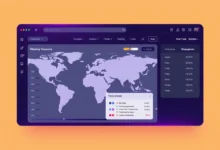
A world clock shows the current local time and date in many cities at once, so you can see what time it is somewhere else without doing the math. The clock below reads the time from your own device and converts it into each city’s time zone, updating every second, so the figures stay accurate as you watch.
The clock below reads the current time from your device and converts it to each city's time zone. No inputs are needed.
What a World Clock Is
A world clock is a single display that shows the present time in several locations side by side. Every place on Earth experiences the same instant, but each region labels that instant with a different clock reading based on its distance from a shared reference. A world clock takes one moment in time and prints it in the local terms of each city, so a 3 PM meeting in London can be read at a glance as 7 AM in Los Angeles or 8 PM in Karachi.
How to Use It
- Open the tool. It reads the current time from your device and shows each city right away.
- Read across each row to see the city, its current local time, and its date.
- Watch the seconds tick. The display refreshes every second so it stays in step with the real clock.
- Compare two rows to find the gap between any pair of cities before you schedule a call.
- Leave the page open as a reference clock while you work with people in other regions.
How Time Zones and UTC Offsets Work
Time zones exist because the Sun reaches noon at different moments around the planet. To keep a shared standard, the world measures every clock against Coordinated Universal Time, written as UTC. Each zone is defined by its offset from UTC, such as UTC-8 or UTC+5, which tells you how many hours to add or subtract to get the local time. A world clock works by storing the UTC moment and applying each zone’s offset.
Daylight Saving Time and Why Offsets Shift
Many regions move their clocks forward by one hour for part of the year, a practice called daylight saving time. During that period a city’s offset from UTC changes, so London moves from UTC+0 to UTC+1 in summer and New York moves from UTC-5 to UTC-4. The start and end dates differ by country, and some regions do not observe it at all. This is why a fixed offset can be wrong for part of the year. This clock uses each city’s named time zone, so it applies the correct daylight saving rule for the current date automatically.
City Time Zones and Standard UTC Offsets
| City | Time zone | Standard UTC offset |
|---|---|---|
| Los Angeles | America/Los_Angeles | UTC-8 |
| New York | America/New_York | UTC-5 |
| London | Europe/London | UTC+0 |
| Berlin | Europe/Berlin | UTC+1 |
| Dubai | Asia/Dubai | UTC+4 |
| Karachi | Asia/Karachi | UTC+5 |
| Kolkata | Asia/Kolkata | UTC+5:30 |
| Singapore | Asia/Singapore | UTC+8 |
| Tokyo | Asia/Tokyo | UTC+9 |
| Sydney | Australia/Sydney | UTC+10 |
Use Cases
See at a glance whether a colleague in another country is in their working hours before you message or call them.
Check the local time at your destination so you can adjust your sleep, confirm arrival times, and avoid calling home in the middle of the night.
Pick a slot that lands inside business hours for everyone, then confirm it against each person’s local clock before you send the invite.
When to Use It
Reach for a world clock any time a moment matters to people in more than one place. That includes scheduling a meeting across countries, tracking market hours, timing a message so it lands during someone’s day, or watching a launch that is announced in a single zone. It removes the guesswork of remembering who is ahead and who is behind, and it stays correct through daylight saving changes that a memorized offset would miss.
Last Thoughts on the World Clock
The trouble with time zones was never the arithmetic. It was keeping track of which way each offset runs and remembering when daylight saving shifts it. A world clock takes that burden off your memory by reading one instant and printing it correctly for every city at once, so you can plan around real local hours instead of doing the conversion in your head.
Keep this clock open when you work across regions, and pair it with the rest of our free online tools. To turn one specific time into another zone, use the time zone converter; to find a slot that works for everyone, try the meeting planner; and to count down to a moment in any zone, use the countdown timer.
Key Takeaways:

- A world clock shows one instant in time expressed as the local time and date in many cities at once.
- Every local time is UTC plus or minus a fixed offset, so converting between zones is addition once you know the offset.
- Daylight saving time shifts a city’s offset for part of the year, which is why named time zones are more reliable than fixed offsets.
- This clock reads the time from your own device and updates every second, so it stays accurate as you watch.
- Use it for remote teamwork, travel, and scheduling calls that have to fit everyone’s working hours.
Frequently Asked Questions (FAQs)
How does a world clock know the right time for each city?
It reads the current instant from your own device’s clock, which is kept in sync over the internet, then applies each city’s time zone rules to convert that instant into local time. Because it uses named time zones rather than fixed numbers, it also applies the correct daylight saving rule for the current date.
What is UTC and why does it matter?
UTC, or Coordinated Universal Time, is the global reference clock that every time zone is measured against. Each zone is defined as an offset from UTC, such as UTC+1 or UTC-5. UTC matters because it gives the world a single shared moment that any local time can be calculated from.
Why do the times change by an hour at certain points in the year?
That is daylight saving time. Many regions move their clocks forward by one hour in spring and back in autumn, which changes their offset from UTC for those months. The start and end dates vary by country, and some places do not observe it, so a city’s offset is not always the same all year.
Is my time zone or location sent anywhere?
No. The clock runs entirely in your browser using the time your device already keeps. Nothing about your location or time zone is uploaded, logged, or stored on any server, so it is safe to use on any network.
Can I use this to schedule a meeting across time zones?
Yes. Read the current local time for each person’s city to see who is in their working hours, then pick a slot that fits everyone. For converting one exact time into another zone, use the time zone converter, and for finding an overlapping window, use the meeting planner.
Why does India show a half-hour offset?
Not every zone is a whole number of hours from UTC. India uses UTC+5:30, a half-hour offset, and a few regions use 45-minute offsets. A world clock that applies real time zone rules handles these cases automatically, which is why the minutes can differ from city to city.
About the author

Nizam Ud DeenFounder and Tech Blogger
Muhammad Nizam Ud Deen Usman is the founder of theCoreiTech and the author of The Local SEO Cosmos. He has worked in search since 2014 as an SEO consultant for eCommerce stores and local businesses, specialising in eCommerce SEO, local SEO and technical SEO, and runs SEO Academy and the SEO Community from Multan, Pakistan. He also founded ORM Digital Solutions, a digital agency serving medium and large businesses, and holds a degree from the University of Education, Lahore (Multan Campus). Plerdy lists him among its Best 20+ SEO Experts in Pakistan. Nizam started theCoreiTech in 2012 to make computers easier to understand and use for everyone. More of his work is at nizamuddeen.com.
